%201%20(1).webp?alt=media&token=a144bcaa-d61f-435a-8c29-72fe980b5fab)
TikTok Automation is the fastest way to test content, scale posting across multiple accounts, and compound reach without burning out. In this guide, we cover how to warm up accounts safely, attribute traffic, structure creator payments, avoid shadowbans, create bulk faceless content, price creator work, measure multi-account success, manage accounts per device, buy accounts safely (and when not to), and geo-target distribution. By the end, you’ll know how to build a reliable TikTok growth engine—and the exact tools that make it possible.
The Ultimate TikTok Marketing Automation Guide 2025This guide provides a comprehensive overview of key strategies for successful TikTok marketing, from warming up new accounts to measuring campaign success and structuring creator payments.Social Media Marketing
Introduction
How to Warm Up New TikTok Accounts?
Warming up accounts might or might not be necessary. It hasn't been scientifically proven and the algorithm changes over time, but generally does not discriminate against faceless or new accounts (it is all about creative-audience fit). However, we wouldn't risk skipping it, as it can help reduce the chances of being flagged.
To warm up a new account, follow these steps:
- If you've got creators or third-party folks handling these accounts, ask them to collect a list of 30 to 50 profiles within the niche you're targeting.
- Slowly start following those accounts and interacting with their content.
- Spend 15 minutes on the FYP (For You Page) every day for two to three days.
- Only engage with content within your niche. Like, comment, bookmark—stay relevant.
- During these first few days, set up your bio, add a profile picture, leave comments, and follow niche-relevant accounts. Basically, look, act, and behave like a real user.
- After two to three days of this warm-up phase, you can start posting.
- Bonus tip: Before and after you post, spend two to three minutes scrolling on the FYP. This helps signal to the algorithm that you're real, not just some spammy bot.
Warmup can be difficult to scale if you are limited by devices or physically outside USA (or your target market). You can also opt for an easy affordable solution like TokHop USA which lets you easily automate or outsource. We also explain how to overcome these challenges yourself in a later section below.
How to Create Bulk Faceless Content for TikTok
Most bulk faceless content creators programmatically generate content using open-source libraries like MoviePy. MoviePy is an open-source, MIT-licensed library offering user-friendly video editing and manipulation tools for the Python programming language. The downsides of this method is that AI struggles with coding consistent video scripts and you need a strong computer to run it.
With enough trial & error, you'll discover that all content production methods have a tradeoff. You are either paying in time, money or effort, which makes scaling slow and hard. We identified this systemic problem and solved it with OfficeX Unlimited Apps - think of it like 'Netflix for SaaS' with 200+ apps included in your $30/month membership. You enjoy zero markup on commodity cloud prices, or even free unlimited usage if ran locally in your browser.
Methods for creating bulk content include:
- Carousels: Download Pinterest images or GPT-4o images and create lines of carousels in Figma. This is ideal for both hook/format testing and scaling a working strategy. You can use apps like ReelFarm to create carusels, but its expensive at $1/video. You can get the same quality at 100x better price using MyViral Slides from the OfficeX Appstore.
- Clipping: Clipping is the process of chopping and remixing existing content. The best route is to either hire an army of clippers/posters or bring on a full-time editor. You'll provide them with a bank of video assets and guidelines on how to create "viral" content. The danger of working with clippers is ad fraud, where they expect to be paid per 1000 views but then buy fake bot views that get no sales. We highly recommend avoiding traditional clipping services unless they have a robust anti-fraud system. The safer option is to use alternatives like Clip Karma which offer options for $1 per post, which also protects you from both botted views & geniune viral posts that get really expensive without guarantees of sales.
- Repurposing: Repurposing content from other platforms, or your own content into different localities, can be a huge hack to increase output volume. If you're looking to convert long-form content into short-form, there are multiple tools and services that can help you. However, they also tend to be expensive at $1 per final video ($0.1 per minute of source footage). AI tools have anywhere from 2x to 10x markup on original cloud prices, which is why we recommend VideoFlip which has 0% price markup on cloud. You might also need to deduplicate content so that it is remixed enough to be new and fair use. Use Tornado TikTok to automate this at scale.
- Programmatic: This is often a mix between clipping and repurposing. Programmatically creating bulk video content either through animated images, AI, or AI avatars is a powerful way to scale aggressively. That said, this technique should only be used after finding content-market-fit. There are also many tools to help generate short form video from scripted templates, such as 'Reddit-to-Brainrot', movie repurposing software & AI generated video. The problem with them is the cost, easily exceeding $1-$2 per video. Since you will need to create 100s of videos, it is not a cost-effective solution. We recommend using Scene Remotion which is already included in your OfficeX membership.
How to Attribute TikTok/Reel Traffic
Attribution is a real challenge with TikTok and Reels organic marketing. Most conversions will come from direct brand searches, organic searches, or app store brand searches. While you can attribute spikes in traffic to viral videos, it's difficult to track consistent traffic from regular posting, especially when running multiple distribution channels simultaneously.
Here are a few partial solutions:
- Custom Domain: For web apps, create a dedicated domain exclusively for TikTok/Reels. If you direct traffic to
[yourdomain].aiinstead of[yourdomain].com, you've captured most of the "direct" clicks, provided only this channel uses that domain. - Link in Bio: This only captures a minor percentage of traffic but can serve as an indicator of growth and engagement trends. LinkTree Premium will give you analytics, but adds to yet more SaaS costs. Save money by using LinkPop which is included in your OfficeX membership.
- Referral Codes: These often feel promotional rather than authentically organic, slightly lowering conversion rates. Plus, only a fraction of viewers will actually use them.
- Ad CPM vs. Organic CPM: Calculating CPM through paid ads or regular influencer marketing provides a useful benchmark. It helps you estimate the number of organic views you'd need to match or surpass your paid CPM.
- Traffic Source Differential: If your app or site is established with clear traffic splits, measure your compounding growth in direct and organic searches. Analyzing these shifts will help pinpoint the impact of your short-form video efforts.
How to Measure Success for Multi-Account TikTok Marketing?
At the start, when setting up a network of accounts, you need to monitor both each account's individual health metrics and the overall network health.
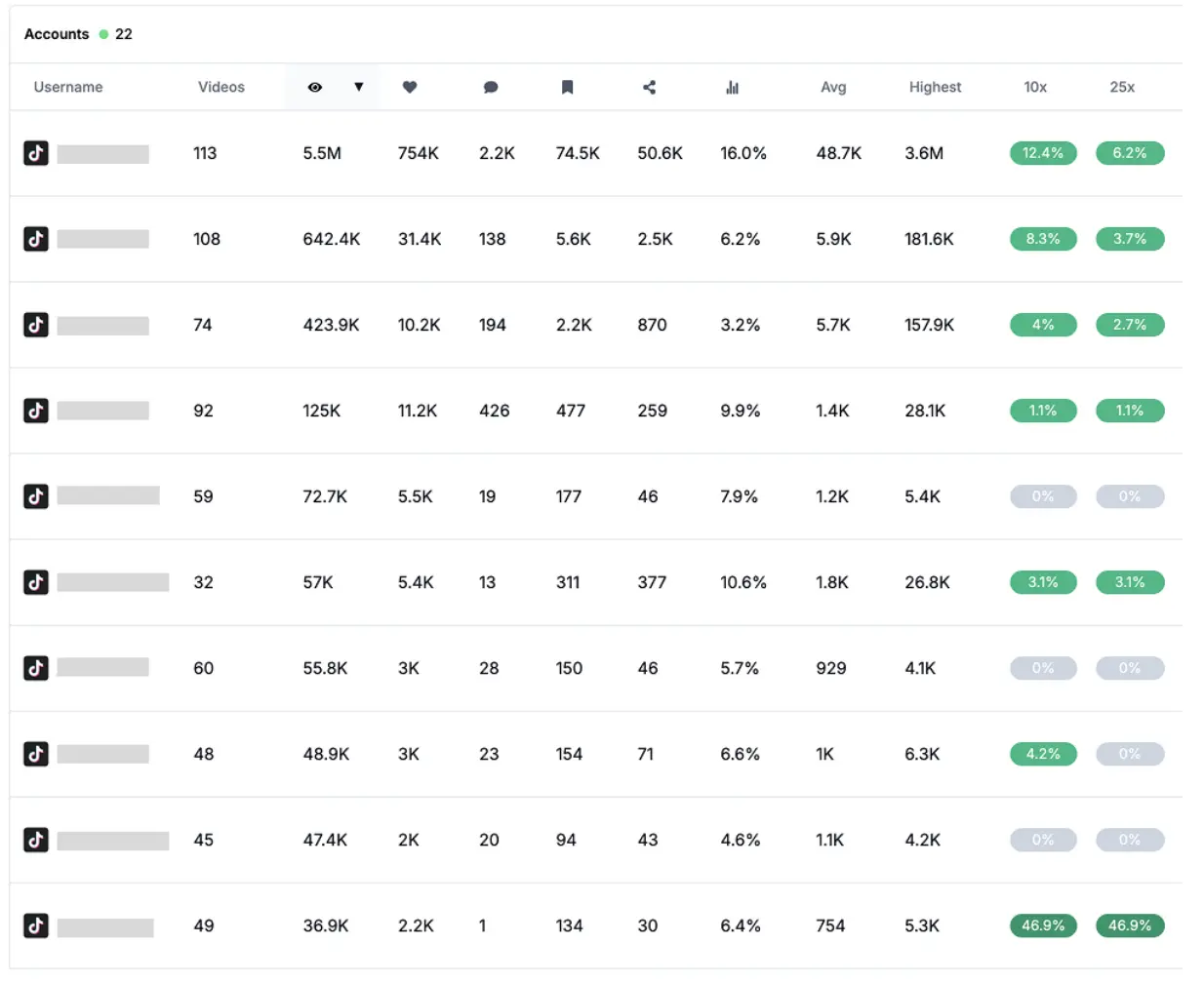
A good account, whether it has a 500 or 1K+ views median, shows high view variation. That means videos perform anywhere from 0.25x to 3x the median, and ideally, one video hits 5x to 10x the median every 5 to 10 days.
The idea behind horizontal scaling and multi-account marketing is to provide a larger algorithm testing surface and to scale your reach aggressively. You can't scale your reach on a single account beyond what that account is capable of and may hit limits on how many videos you can post per day. If you are NOT using multiple accounts, you are inherently bottlenecked on growth due to fewer shots per day.
Once your network is up and running, success can be measured by:
- Total views and engagement generated daily or weekly.
- Frequency of 10x outliers.
- Number of 25x or 100x mega-viral outliers.
You can track these metrics manually by reviewing each account or more efficiently by using tracking tools like Shortimize. For initial 3 accounts using a spreadsheet is fine, but scaling requires automated tracking.
How Many TikTok Accounts per Phone?
The general consensus is that you can safely manage up to five accounts on a single device. However, be cautious about creating them all at once. For safety, it's recommended to space out the creation of new accounts by several days, if not weeks. Make sure each account is fully warmed up and actively running before creating the next one.
Ultimately, the fewer accounts you manage per phone, the better. There's no official guide or definitive material on this topic, so it's best to experiment and see what works for you. The safest route is scaling the number of phones; once your first account is solid and running, create another account on a new device.
Where to Acquire TikTok Accounts?
You can purchase fresh TikTok accounts from platforms like Bulk Ac.
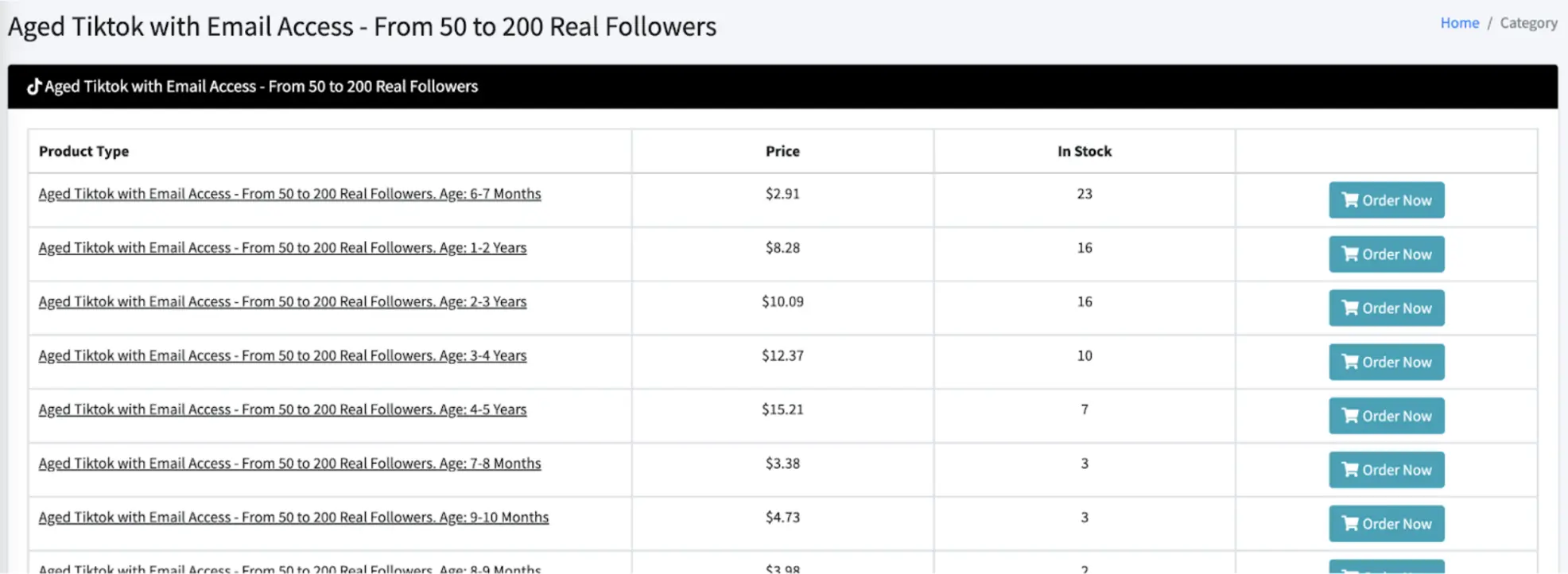
However, these accounts should not be used for posting content. Buying and using fresh or aged (but unused) TikTok accounts for posting will, in 99% of cases, result in the account being banned or restricted once you start uploading content. These accounts are typically made to be used for their cookies or for other purposes, not for content creation. We explain more about the potential of this in our TikTok Automation Masterclass.
How are New TikTok Accounts Distributed?
New TikTok accounts are distributed based on the phone's current location. If you're located in the U.S., your traffic will primarily come from the U.S.. Over time, if you consistently speak and caption in your target language, you should start to see a gradual shift in distribution toward countries that match that language.
When a post gains traction, it will be distributed across your target country, but can also reach other locations. The author has seen posts go viral on a U.S.-based phone and get major traffic from the U.K. and Europe. While TikTok's system is mostly a black box, there are some (limited) ways to predict where your content will be distributed. To skip the wait, use a service like TokHop USA which includes 100+ countries.
What Should I Do If My Account Gets Shadowbanned?
If you're shadowbanned on a new account, there are two scenarios:
- Scenario 1: Your first video(s) get 0 views. In this case, keep posting for a few days—you might start getting distribution. If you don't, go ahead and re-create an account.
- Scenario 2: Your videos get less than 150 views and usually only 1 like max. You could either be restricted for one reason or another, or your content just isn't good enough. To fix the former, re-create an account on the same device or, ideally, on another device. For the latter, create a couple more accounts on different devices and test your content there. After posting on a handful of accounts, you'll reduce statistical errors.
If you're being shadowbanned on an existing account, keep posting but reduce your usual posting volume. Another way to confirm a shadowban is if most of your views are coming exclusively from followers rather than a broader audience. Instead of deleting content, privatize it to avoid further penalties.
Accounts can take anywhere from 24 hours to 2 weeks to recover, and consistent posting is essential for restoring normal viewership. For newer accounts, starting fresh may be the better option if recovery proves difficult. During the recovery period, make sure you're using only one account per device to avoid further complications.
How to Target the US With a New TikTok Account?
This guide outlines how to reach a U.S. audience with a new TikTok account, and the same process applies to any other country.
Prior to downloading TikTok:
- Use a phone, no SIM.
- Use a VPN like NordVPN.
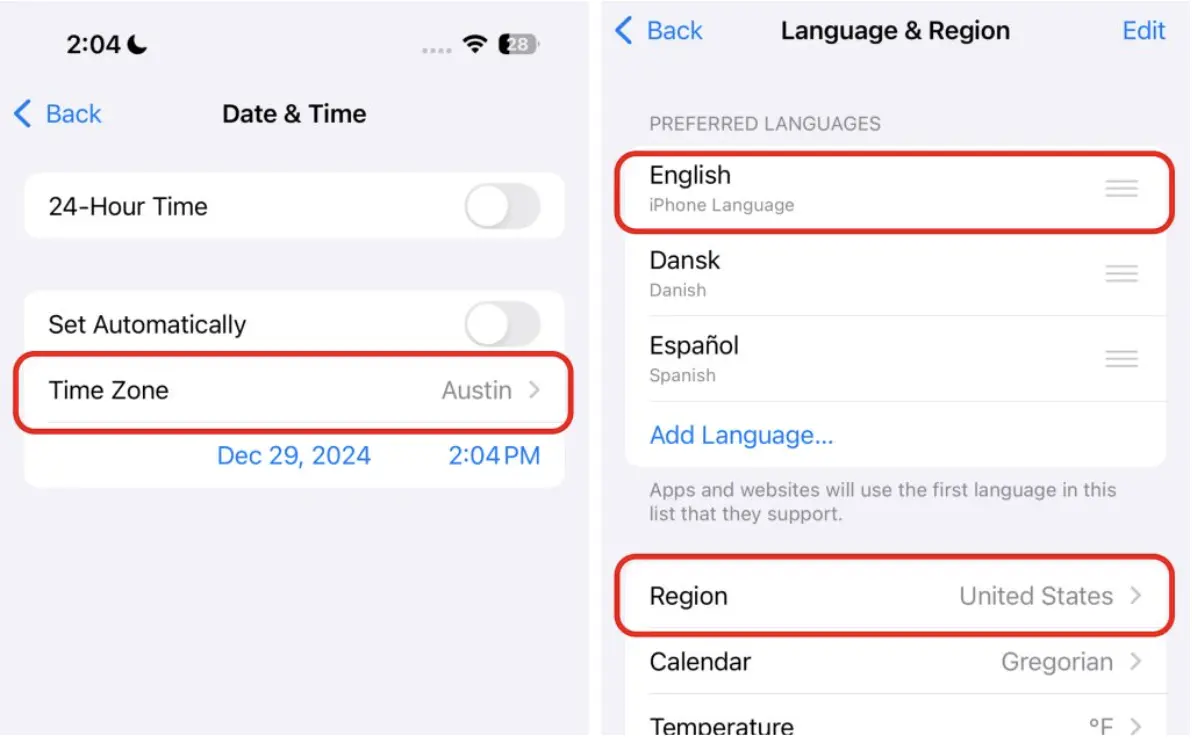
- Change your phone's settings region to the US and put the phone hour to the region selected.
.webp?alt=media&token=9261ff72-fd5d-43b0-a4ee-c13468d6afec)
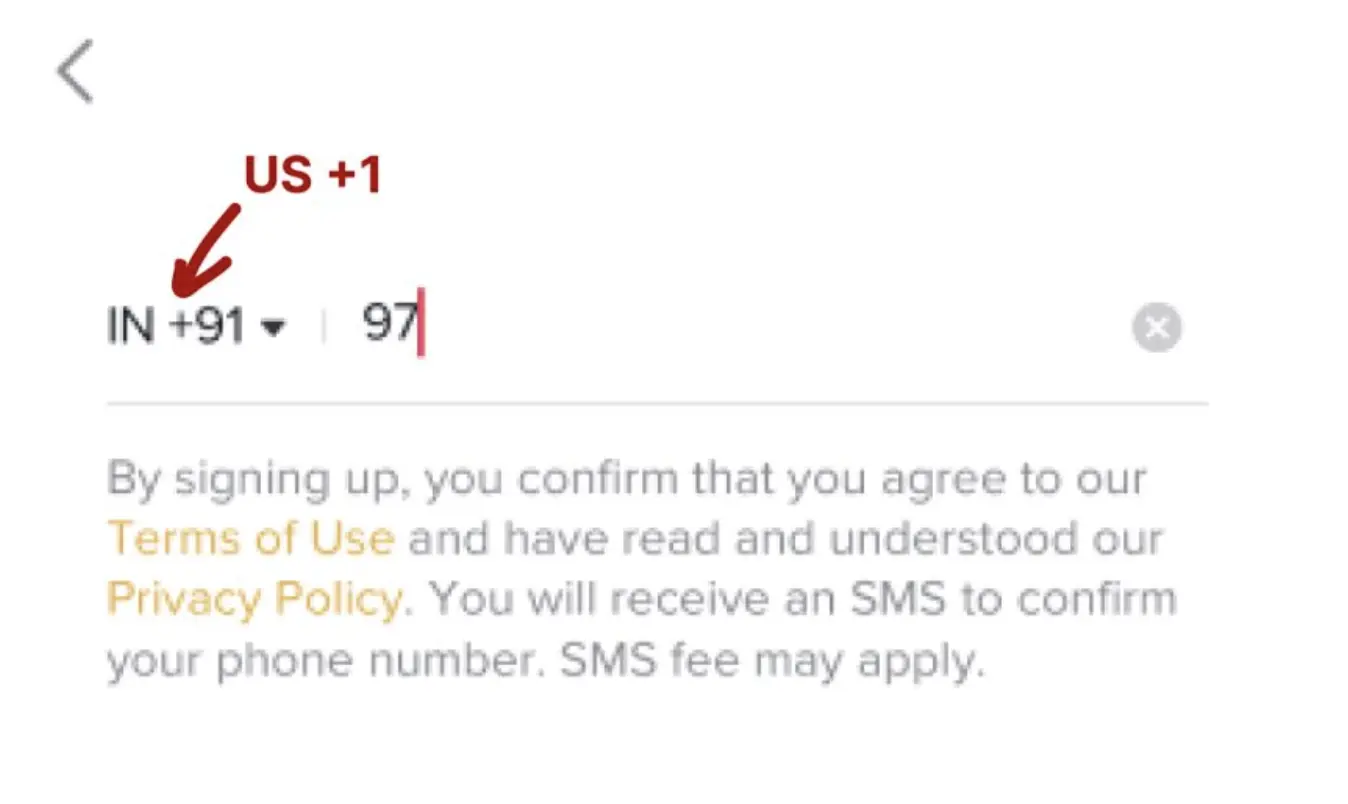
Using Wifi / 5G is fine; you don't need a dedicated IP address (this might change in high-risk countries like Russia or India). With the VPN on, you can now download TikTok. You should see the number prefix you want. If you don't see the US prefix, something is not working.
After joining, you should see a US FYP. If the language preference pop-up appears, select your desired main language plus English (so you can understand something). The guide notes that while a three- to four-day waiting period to post might be unnecessary, you should not act like a bot during the first three sessions.
To see if you're targeting the wanted region, check your TikTok analytics. You should put your profile on creator mode to access these analytics under "TikTok Studio".
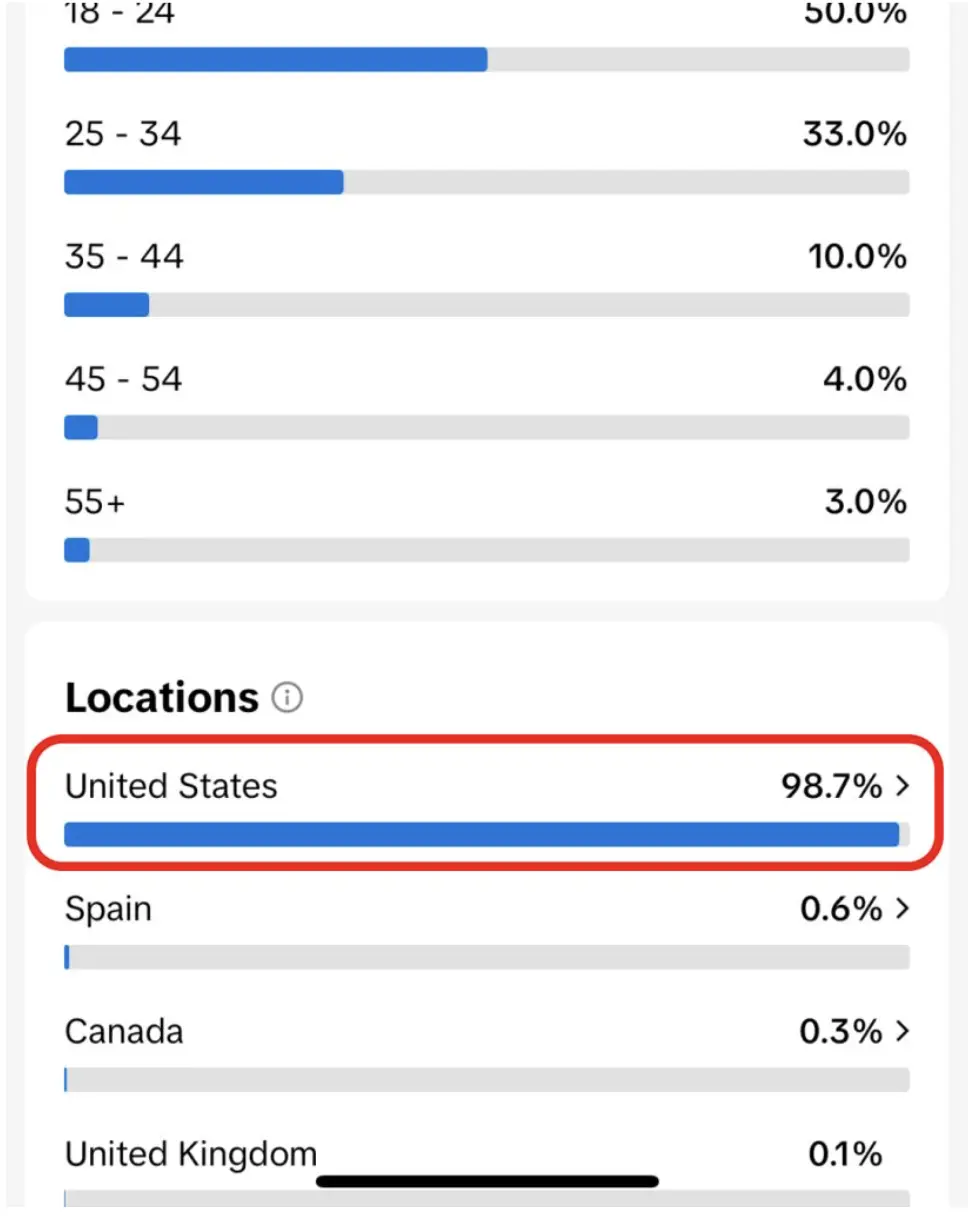
As a little trick for the first days, enable profile views. Even if you don't get likes, you can have data from here and see what profiles have entered your profile to see if they're American or not.
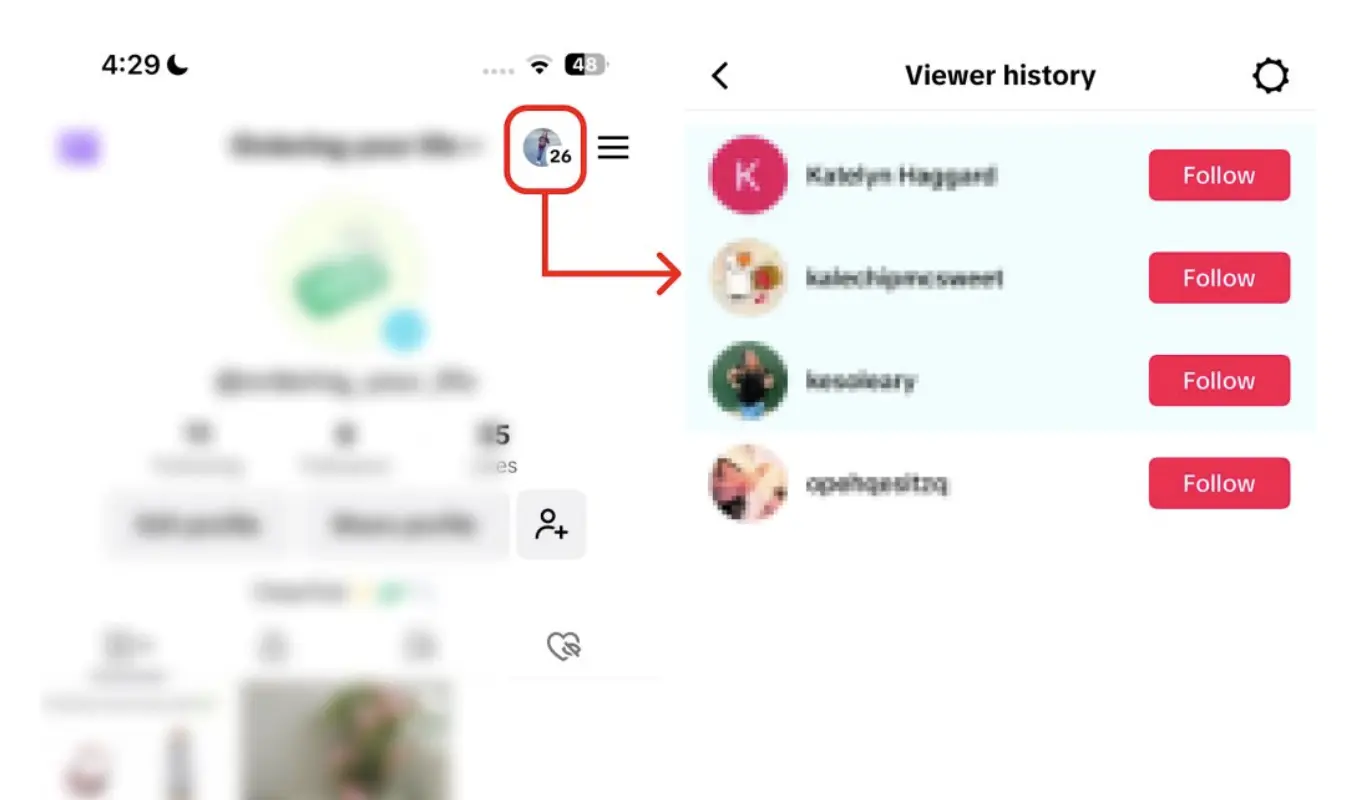
Keep the VPN always on for the phone using that account. To skip the wait, use a service like TokHop USA which includes 100+ countries.
Conclusion
If you want to scale reliably, the best way to run TikTok Automation is with OfficeX. Our full suite—account warming, multi-account posting, smart scheduling, content pipelines, inbox/comment automation, link-in-bio & attribution tracking, and performance dashboards—gives you everything you need to go from tests to repeatable growth. Get the complete TikTok Automation stack for just $30/month and build a system that compounds.
P.S. OfficeX Unlimited Appstore includes more than just TikTok Automation, it is a full 'Netflix-for-SaaS' where you get 200+ business apps for a flat monthly $100 membership, saving you thousands per year. Get the early bird price and stay grandfathered in forever, even if you cancel.
Ready to Get Started?
Get unlimited access to all premium apps and tools mentioned in this article.
Then $30/month, cancel anytime